Streamline Your Billing with a Professional Pricelist Invoice Design
Managing the financial side of a creative project often feels like a chore, but it is a critical part of running a sustainable business. You need a system that not only tracks your work but also presents your brand in the best possible light. This is where a well-crafted Pricelist Invoice Design becomes an invaluable asset. It is more than just a bill; it is a final, professional touchpoint with your client that reinforces the quality of your work and ensures you get paid promptly and accurately.
A Template Built for Clarity and Efficiency
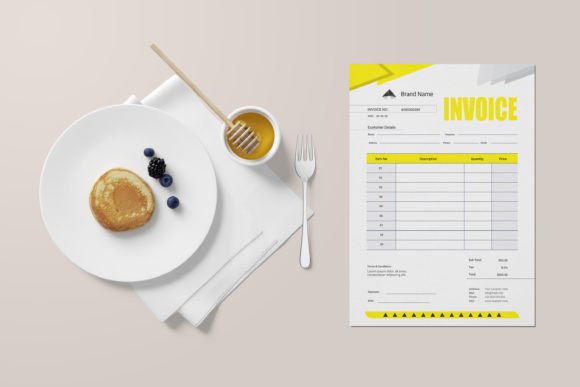
The core strength of this Pricelist Invoice Design lies in its practical, user-centric layout. It is structured to help you list and count every piece, service, or hour on every project you undertake. The design guides the eye naturally from the client details to the itemized list of services or products, the calculated totals, and the final amount due. This clarity minimizes confusion and back-and-forth, making it easier for your clients to approve and process payment. The visual personality is clean, modern, and professional, striking a balance between aesthetic appeal and functional readability. It avoids unnecessary ornamentation, focusing instead on a strong visual hierarchy that makes key information instantly accessible.
This template is fully editable and customizable, giving you complete control over the final output. You can adapt it to match your specific brand identity, whether that involves sophisticated serif fonts for a luxury feel or clean sans serif fonts for a tech-forward look. The file is provided in multiple formats—AI, EPS, and JPEG—ensuring compatibility with the major design software you already use, including Adobe Illustrator, Adobe Photoshop, and Microsoft Word. This flexibility means you can integrate it seamlessly into your existing workflow, whether you are a solo designer or part of a small team.
Essential Features for a Flawless Workflow
Every detail of this design template is optimized for real-world use. The A4 size with bleed ensures your document is print-ready, eliminating the guesswork and extra steps often required to prepare a file for a professional printer. With a 300 DPI resolution and color mode editable settings, you have the precision needed for high-quality output, whether for digital submission or physical mailing. The well-organized layers in the design files mean you can quickly locate and edit specific elements without navigating a confusing mess, saving you valuable time.
The package also includes two color variations, allowing you to choose a palette that best resonates with your brand's personality or the specific project's mood. The use of free fonts removes any hidden costs or licensing headaches, making this a truly accessible design asset for businesses of all sizes. Furthermore, the vector design is scalable to any dimension, so whether you need a standard invoice or a larger format for special documentation, the quality remains crisp and professional.
Practical Applications Across Industries
While its primary function is billing, the utility of a strong Pricelist Invoice Design extends into several areas of business operations. For freelance designers and creative agencies, it serves as a consistent part of their brand identity, presenting a unified image from the initial proposal to the final invoice. For product-based businesses like crafters, artists, or small manufacturers, the itemized listing is perfect for detailing specific pieces, quantities, and costs, ensuring every component of an order is accounted for.
Imagine a web designer sending this invoice to a client. The clean layout allows them to clearly separate charges for concept design, development hours, and stock photo licenses. A publisher could use it to bill for editorial services, listing manuscript evaluation, copyediting, and layout design as separate line items. The professional appearance builds trust and reinforces the value of the services rendered, which is a subtle but powerful part of client management and visual communication.
Making the Template Your Own
Getting started is straightforward. After downloading the files, open the appropriate format in your preferred software. Begin by updating the header with your business name, logo, and contact information. This immediately personalizes the document. Next, adjust the color scheme to align with your brand's primary and secondary colors. The template's structure makes this a simple process of selecting and changing fill or stroke colors.
When populating the invoice with project details, be as specific as possible. Use the itemized sections to list deliverables, hourly rates, or product SKUs. The design is built to handle detailed lists without looking cluttered, which helps in presenting a transparent account of your work. Before finalizing, always review the document for consistency in font usage and spacing. A consistent typographic approach enhances readability and contributes to a polished, professional appearance.
Finally, remember that the images used in the preview are not included. This is your canvas to populate with your own branding and project-specific details. The template provides the robust framework; you provide the unique content that makes each invoice relevant to a particular client and project. By leveraging this adaptable Pricelist Invoice Design, you transform a routine administrative task into an opportunity to showcase your professionalism and attention to detail, ultimately supporting a smoother path to getting paid for your valuable work.